- Home
-
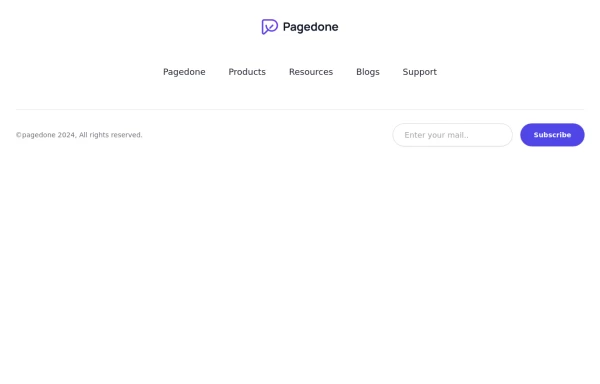
Default Tailwind Footer
Use this example of a footer section divided in five columns with brand logo, desciption, sitemap links and social media accounts.
This tailwind example is contributed by Pagedone, on 02-May-2024. Component is made with Tailwind CSS v3. It is responsive.
Author Pagedone
Related Examples
-
Newsletter form with Pre-footer CTA
Get started with this example with a CTA section before the footer, a sitemap links, the logo of your brand, a newsletter sign-up form, and the copyright notice.
1 year ago2.5k -
Responsive Website Footer
A modern and clean website footer component with sections for branding, navigation links, social media icons, and copyright text. Designed to be fully responsive and suitable for portfolios, business websites, and web applications.
1 week ago66 -
canvas fully covers
canvas fully covers
1 year ago3.8k -
Modern Dark Footer with Overlapping Gradient CTA
A comprehensive, dark-themed website footer component built with HTML and Tailwind CSS. It features a visually distinct overlapping section with a colorful gradient background containing a prominent call-to-action (CTA) block. The main footer area utilizes a multi-column grid layout for organized navigation links, a newsletter signup form, and social media icons. A final bottom bar includes legal links and copyright information. The design is responsive and adapts its layout for different screen sizes.
8 months ago1k -
Footer for blog
https://github.com/tailwindow/component
3 years ago18.2k -
Responsive eCommerce Footer Component with Tailwind CSS
A modern, fully responsive eCommerce footer component built with Tailwind CSS. It includes multiple sections like company info, account links, help center, categories, social media icons, payment methods, and app download buttons. Optimized for seamless mobile and desktop experiences, making it perfect for any online store or business website.
10 months ago1.1k -
Footer
Simple Dark footer
5 months ago585 -
Horizontal footer with dark version
Use this example for simple horizontal layout of footer in dark version with brand logo, sitemap links and social media accounts.
1 year ago3.1k -
Crafting a Responsive Footer with TypeScript, and Tailwind CSS
This is a well-structured and comprehensive footer section that uses Tailwind CSS for styling and layout. Here’s a brief explanation of what each part does: Footer Container (<footer class="bg-gray-800">): The footer is wrapped in a <footer> element with a dark background using the bg-gray-800 class. The aria-labelledby="footer-heading" attribute is used for accessibility, linking the <footer> to the invisible heading (<h2 id="footer-heading" class="sr-only">Footer</h2>). Main Content Area: The content inside the footer is centered and spaced using utility classes like max-w-7xl mx-auto py-12 px-4 sm:px-6 lg:py-16 lg:px-8. Footer Sections: The footer is divided into several sections using grid layouts (xl:grid xl:grid-cols-5 xl:gap-8), which organize content into columns. Each section (Solutions, Support, Company, Legal) contains a heading with a list of links. These links are styled with Tailwind classes for consistent spacing and hover effects (text-base text-gray-300 hover:text-white). Language & Currency Selector: This section provides dropdowns for selecting language and currency. Tailwind's form utilities (@tailwindcss/forms plugin) are used to style the select elements. Newsletter Subscription Form: A subscription form is provided with an email input and a submit button. The form is styled to be responsive, with focus states for accessibility (focus:ring-2 focus:ring-offset-2). Social Media Links: Social media icons (Facebook, Instagram, etc.) are included, each wrapped in a link with hover effects. Icons are created using SVGs, which are scalable and look sharp at any size. Final Section: The footer concludes with another grid layout, ensuring spacing and alignment for different screen sizes. Customization Tips: Colors: You can easily customize the colors using Tailwind's utility classes (e.g., bg-gray-800, text-gray-400) to match your design. Icons: Replace SVGs with the appropriate icons for your needs. You might use a different icon set or add more icons. Responsive Design: Tailwind's utility classes like sm:, md:, lg:, xl: ensure that the footer is responsive across devices. Adjust the layout or padding if needed. Additional Considerations: SEO: Ensure the links in the footer point to meaningful pages to improve SEO. Accessibility: Consider adding aria-labels to the form elements and social media links to enhance accessibility further. This footer is ready to be integrated into a Tailwind CSS-powered project, offering both aesthetic appeal and functional utility.
1 year ago2.9k -
Footer with background
Apply background color to your footer to provide immense look of footer area.
1 year ago2.7k -
Modern Website Header & Footer
I created a professional header and footer using HTML and Tailwind CSS with modern design elements, smooth animations, and interactive features.
6 months ago1.2k -
Creative with CTA buttons
Use Below tailwind css footer example with CTA buttons and site links.
1 year ago2.4k
Explore components by Tags
Didn't find component you were looking for?
Search from 3000+ components