default images playground
an images gallery
This tailwind example is contributed by mingderwang, on 05-Jun-2026. Component is made with Tailwind v3.4. It is responsive. similar terms for this example are Masonry, Image grid

Related Examples
-

-
 Pinterest-Style Masonry Gallery
A Pinterest-inspired masonry gallery featuring images of different heights in a seamless multi-column layout.
186 -
 Creative Bento Gallery
A modern bento-style gallery combining differently sized image cards in a structured and visually engaging layout.
312 -
 Reset Password UI
Reset password screen built with pure HTML and Tailwind CSS. Includes new password and confirm password fields, password strength indicator, security requirements checklist, inline SVG icons, and a premium glassmorphism SaaS interface.
-
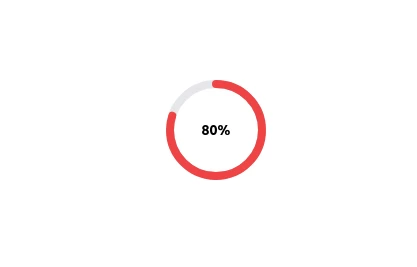 Radial Progress Indicator with TailwindCSS
A sleek and customizable radial progress indicator built with SVG and styled using TailwindCSS. The progress bar is animated with smooth transitions, featuring a circular background, dynamic progress, and centered text or optional imagery. Perfect for showcasing percentages, stats, or any progress-related metrics in your projects.
3.7k -
 Clean Image Grid Gallery
A clean and balanced image gallery arranged in equal-sized columns for a simple, organized presentation.
240 -

-

-
 visacardes
I'll create professional Visa card components with realistic styling and multiple card types
1.2k -
 Avant & Après
Avant & Après
925 -
 Certificate of Completion
A clean and modern certificate template built with Tailwind CSS. Ideal for courses, training programs, and professional achievements.
757 -
 trusted by
1. Color Scheme: 1. Updated the background to a gradient from Indigo-800 to Blue-900 2. Changed text colors to use Indigo-800 and Blue-900 shades 3. Updated ring colors on avatar images to match the new scheme 2. Enhanced Design: 1. Added a containing card with white background (dark gray in dark mode) 2. Increased the size of avatar images for better visibility 3. Added a shadow effect to the card that changes color on hover 3. Responsiveness: 1. Maintained the responsive layout, stacking vertically on smaller screens 4. Animations and Interactions: 1. Added a fade-in animation for the entire component 2. Enhanced hover effects on avatar images (scale and z-index change) 3. Added a ring effect on hover for each avatar 5. Accessibility: 1. Maintained alt text for images 2. Ensured proper color contrast for text readability 6. Dark Mode: 1. Implemented dark mode support 2. Adjusted colors and ring effects for dark mode 7. Additional Enhancements: 1. Increased font sizes for better readability 2. Added font weight variations to emphasize important text 3. Improved spacing and alignment This updated component maintains the original functionality while incorporating the Indigo-800 and Blue-900 color scheme and adding enhanced visual effects and interactions.
2.3k






Browse by topic
Explore components by Tags
Jump straight to the UI pattern you need.
Can't find it?
Didn't find the component you were looking for?
Search across 3,000+ community-built components and grab the code in seconds.