AutoTrade
Browse thousands of quality used cars from trusted sellers. Great prices and easy financing options available
This tailwind example is contributed by INGRIDE MUZIRANENGE, on 27-May-2025. Component is made with Tailwind v3.4. It is responsive.

Related Examples
-
 Irish Destination
For Irish road signs Destination
311 -
 Certificate of Completion
A clean and modern certificate template built with Tailwind CSS. Ideal for courses, training programs, and professional achievements.
757 -
 Pricing Plans
This plan offers access to all basic features, including unlimited projects and 24/7 support
1.1k -
 Pinterest-Style Masonry Gallery
A Pinterest-inspired masonry gallery featuring images of different heights in a seamless multi-column layout.
182 -
 Forgot Password
Forgot Password
-

-

-
 machine
A fully interactive, web-based macOS-style desktop environment featuring draggable and resizable windows, a dynamic Dock with magnification, smooth glass UI effects, adaptive colors, a functional photo gallery with hover menus, and integrated mini-apps like Safari, Notes, Weather, and App Store. Built using HTML, CSS, Tailwind, and JavaScript to recreate a modern OS experience directly in the browser.
665 -

-
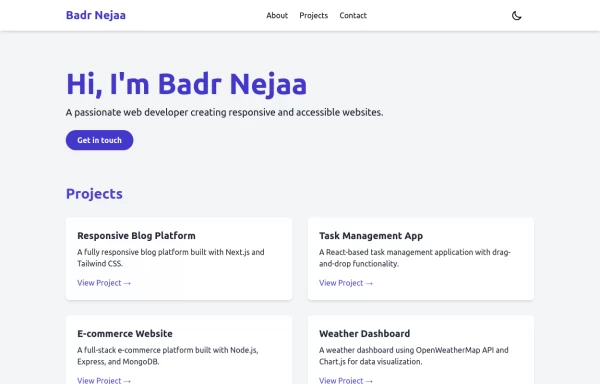 Portfolio
This responsive portfolio with dark mode support includes: 1. Fully responsive design that works on both desktop and mobile devices 2. Dark mode toggle with system preference detection and local storage persistence 3. Indigo-800 and Blue-900 color scheme for primary colors in light and dark modes 4. Beautiful animations and effects: 1. Fade-in and slide-up animations for sections using Intersection Observer 2. Hover effects on projects and buttons 3. Smooth scrolling for navigation 5. Mobile-friendly navigation with a toggle menu 6. Sections for About, Projects, and Contact 7. A contact form with styled inputs 8. Social media links in the footer 9. Accessibility considerations (proper heading structure, color contrast, focus styles, ARIA labels) Key features: - The color scheme uses Indigo-800 for light mode and orange-400 for dark mode as primary colors - Dark mode toggle in the header with a sun/moon icon - Sections fade in and slide up as they enter the viewport - Project cards have a hover effect with scaling and increased shadow - The contact form has animated focus states - Social media icons change color on hover - The layout is responsive, with a hamburger menu for mobile screens - Smooth scrolling behavior for navigation links - Dark mode preference is saved in local storage and syncs with system preference This implementation provides a visually appealing, accessible, and functional responsive portfolio with dark mode support, using HTML, Tailwind CSS, and vanilla JavaScript for the
4k -

-
 loginForm3
form
78






Browse by topic
Explore components by Tags
Jump straight to the UI pattern you need.
Can't find it?
Didn't find the component you were looking for?
Search across 3,000+ community-built components and grab the code in seconds.